ArcPanel manages a firewall on nftables with Fail2Ban, both installed by default. One table, inet arcpanel, filters IPv4 and IPv6 alike: the firewall drops every incoming connection that no rule accepts, over both versions, and Fail2Ban bans addresses that fail to log in too often.
Open Network › Firewall under Server. The page appears when the firewall is installed.
The default rules
| Rule | Ports |
|---|---|
| PING | ICMP |
| ARCPANEL | 8083 (the panel) |
| IMAP | 143, 993 |
| POP3 | 110, 995 |
| SMTP | 25, 465, 587 |
| DNS | 53, TCP and UDP |
| FTP | 21 and 12000–12100 |
| WEB | 80, 443 |
| SSH | 22 |
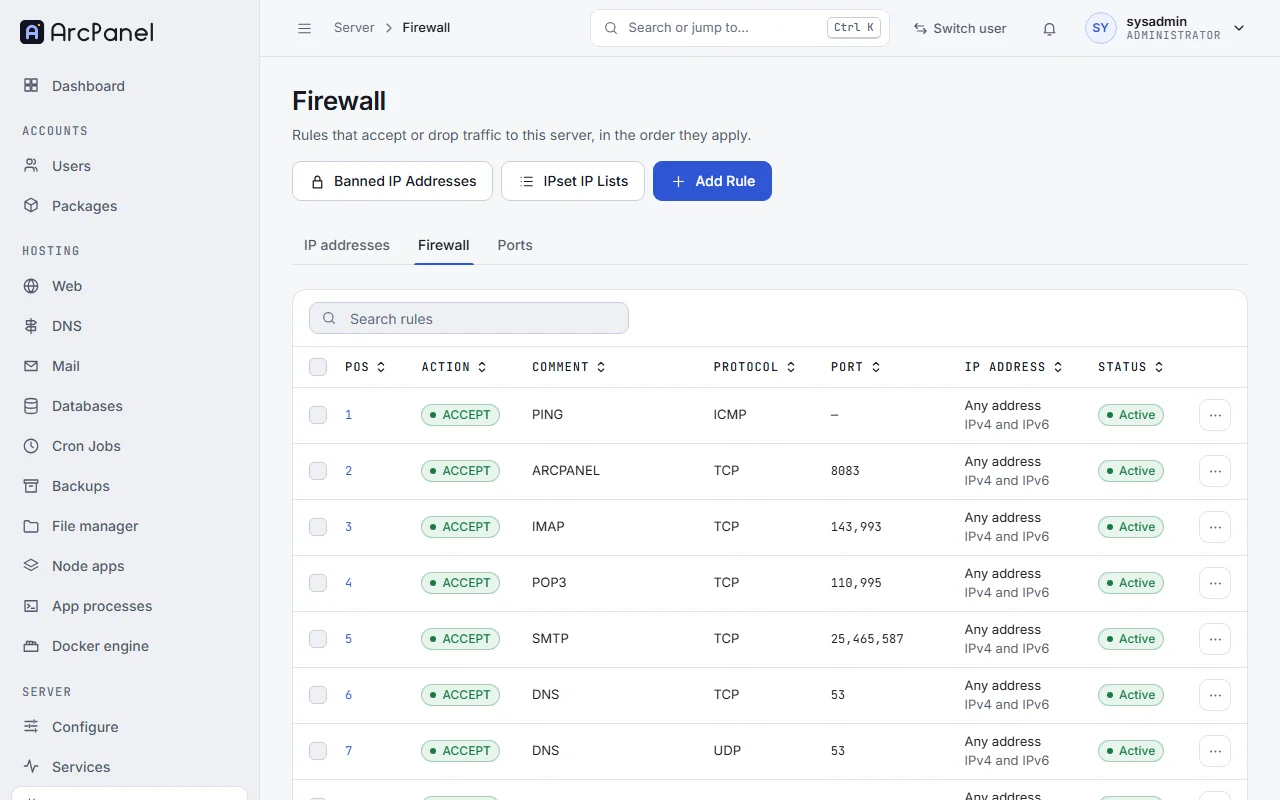
All accept connections from any address: the list shows Any address with IPv4 and IPv6. The installer leaves out the rules of services you did not install. When you change the panel port (v-change-sys-port) or the SSH port, ArcPanel updates the ARCPANEL and SSH rules. Ports that ArcPanel opens for webmail (8086) and phpMyAdmin (8087), and for public ports of the port registry, get rules of their own; the rules of the port registry show Managed by Ports and are changed on the Ports page.
Note
A server upgraded from ArcPanel 2.2 moved from iptables to nftables with the 2.3.0 upgrade; its rules, bans and IP lists came along. Rules you added with your own
iptablescommands incustom.shdid not: write them as nftables commands incustom.nft(below).
Add a rule
Click Add Rule:
| Field | Value |
|---|---|
| Action | DROP to block, ACCEPT to allow |
| Protocol | TCP, UDP or ICMP (ICMP covers ping over IPv4 and IPv6) |
| Port | A port, a range (80-82), a list (80,443,8080), or 0 for all ports |
| IP Address / IPset IP List | An IPv4 or IPv6 address or range such as 203.0.113.0/24 or 2001:db8::/32; 0.0.0.0/0 or ::/0 for every address of both versions; or an IP list |
| Comment | Optional; it names the rule in the list |
Rules apply from the top of the list down, and the first rule that matches decides. Use Move Firewall Rule Up and Move Firewall Rule Down in a rule's menu to order them, Suspend to turn one off for a while, and Delete to remove it. Every change replaces the whole table in one step, after nftables has checked it, so a rule set nftables refuses never replaces the one that runs.
For example, to let only your office reach SSH, add an ACCEPT rule for port 22 from the office's address, move it above the SSH rule, then change the SSH rule to DROP:
v-add-firewall-rule ACCEPT 203.0.113.10 22 TCP "SSH from the office"
v-list-firewall
If you also reach the server over IPv6, add the office's IPv6 range the same way. When the rules open the panel port or SSH to IPv4 addresses only and the server has an IPv6 address, the page says so: The panel is closed over IPv6 or SSH is closed over IPv6.
Caution
Do not drop the panel port (8083) or SSH for every address before a rule accepts your own: you would lock yourself out. If that happens, use your provider's console and run
v-delete-firewall-ruleorv-stop-firewall.
Warnings of the Firewall page
The page compares the rules the server runs with the panel's rules, as v-check-firewall does, and shows a warning with Reload firewall when they differ:
| Warning | What happened | What to do |
|---|---|---|
| The loaded firewall rules differ from these rules | Something outside the panel changed the table | Reload firewall |
| The firewall rules are not loaded | Something outside the panel removed the table | Reload firewall |
| The nftables service of the distribution is enabled | Starting, reloading or stopping nftables.service removes every nftables table, the panel's included |
sudo systemctl disable nftables, unless you need it |
| The Fail2Ban action is out of date | Fail2Ban still uses the action of an older release, so its bans do not reach the firewall | Reload firewall, which replaces the action |
| The firewall did not move to nftables | The 2.3.0 upgrade could not load the nftables rules, so the server still runs its old iptables rules | Reload firewall to see the error; the first reload that loads the rules finishes the move |
v-check-firewall
v-update-firewall
Fail2Ban bans
Fail2Ban watches the logs and bans an address that fails to log in too often, over IPv4 or IPv6. Its jails and the firewall chains they ban in:
| Jail | Watches | Chain | On by default |
|---|---|---|---|
ssh-iptables |
SSH logins | SSH | Yes |
arcpanel-iptables |
Panel logins | ARCPANEL | Yes |
exim-iptables |
SMTP logins | Yes | |
dovecot-iptables |
IMAP and POP3 logins | Yes | |
phpmyadmin-auth |
phpMyAdmin logins | WEB | Yes |
recidive |
Addresses banned 5 times a day | RECIDIVE | Yes, 10 days |
vsftpd-iptables |
FTP logins | FTP | No |
mysqld-iptables |
Database logins | DB | No |
roundcube-auth |
Webmail logins | WEB | No |
The jails keep their names from earlier releases; their bans go to the nftables table. Banned IP Addresses on the Firewall page opens the list of banned addresses with their Chain, Date and Time, and a search box. Delete a ban, or select several and delete them together, to let the addresses in again; ArcPanel also lifts them in Fail2Ban. Ban IP Address bans an IPv4 or IPv6 address or range by hand in a chain you choose.
When the firewall is stopped on the Services page or with v-stop-firewall, it stays stopped when Fail2Ban bans an address; the ban is recorded and applies when the firewall starts again.
When you lock yourself out, lift the ban from another address or from the provider's console:
v-list-firewall-ban
v-delete-firewall-ban 198.51.100.7 ALL
IP lists
An IP list is a named set of addresses that a rule can use as its source, so that one rule blocks or allows many addresses. Open IPset IP Lists and add a list with:
- IP List Name;
- Data Source: a URL of a list, a
script:that prints addresses, or afile:on the server; Known lists offers a list of known malicious addresses and lists of the addresses of 16 countries, for IPv4 and IPv6; - IP Version, IPv4 or IPv6, and Auto Update (once a day).
Then add a rule whose IP Address / IPset IP List is the list, for example DROP on all ports. A list that an active rule uses cannot be deleted; the error names the rule.
v-add-firewall-ipset blacklist "script:/usr/local/arcpanel/install/common/firewall/ipset/blacklist.sh" v4 yes
v-add-firewall-rule DROP ipset:blacklist 0
Your own nftables rules
Rules the panel cannot express go into /usr/local/arcpanel/data/firewall/custom.nft, as nftables commands. ArcPanel loads the file together with its own table, in the same step, every time it writes the rules; when nftables refuses the file, the running rules stay as they are and the panel shows the error. For example, to accept a database port from one network:
add rule inet arcpanel input meta l4proto tcp th dport 3306 ip saddr 198.51.100.0/24 accept
Then load the rules with v-update-firewall.
From the command line
v-list-firewall
v-add-firewall-rule DROP 2001:db8:bad::/48 0 TCP "block a range"
v-suspend-firewall-rule 11
v-delete-firewall-rule 11
v-update-firewall
v-check-firewall
v-update-firewall writes the rules into nftables again and saves them in /etc/arcpanel/firewall.nft, which the arcpanel-firewall service loads at boot.
Next steps
- Port registry for the public ports of apps.
- Server settings for the API addresses and the login policies.